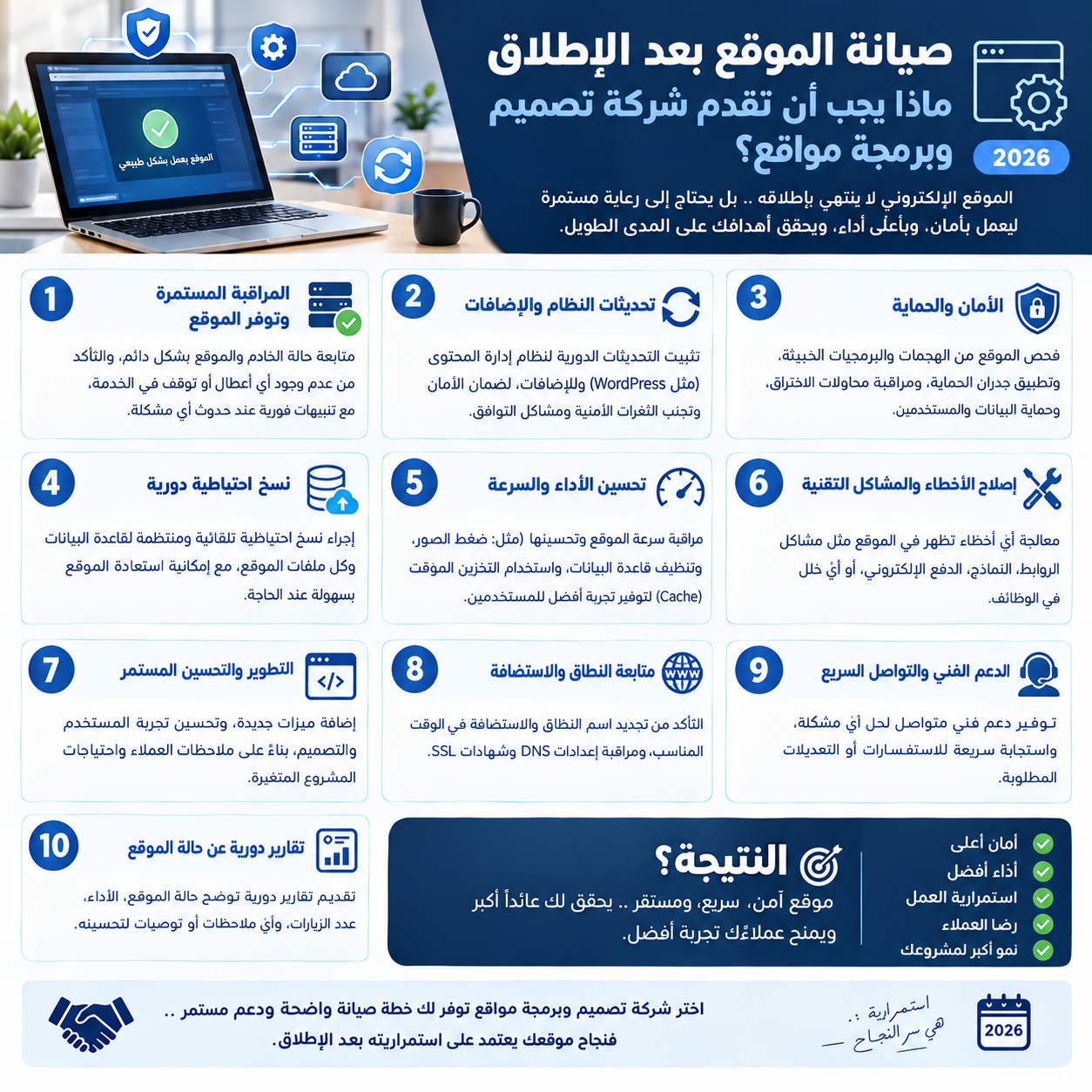
Website Maintenance After Launch: What a Web Design & Development Company Should Provide 2026
Many people think the relationship with a web design company ends on launch day. In reality, a website is like a car: it needs regular servicing, or its performance slowly declines. Plugins age, security vulnerabilities are discovered, speed drops as content piles up, and Google changes its standards. This guide explains what a web design and development company should provide after launch and how to choose the right maintenance plan.
Why a Website Declines Without Maintenance
- Security vulnerabilities: outdated PHP versions, frameworks, and plugins are the most common entry point for attacks.
- Gradual slowdown: uncompressed images, a bloated database, and extra scripts accumulate.
- Silent failures: a contact form stops sending, or a payment gateway changes its API, and nobody notices until customers are lost.
- Search decline: broken links, indexing errors, and weak Core Web Vitals.
Core Maintenance Tasks
1. Security and Technical Updates
Update the system, framework, and libraries regularly, after testing on a staging copy rather than directly on the live site. Modern technologies such as Laravel release periodic security updates that need to be applied.
2. Backups and Restore
Daily or weekly backups of files and the database, stored off the server itself. More important than backing up: testing a restore periodically to make sure the backup actually works.
3. Uptime and Performance Monitoring
Tools that alert the company the moment the site goes down, plus a monthly review of speed and mobile Core Web Vitals, image compression, and database cleanup.
4. SEO Health
Review Google Search Console for indexing errors, fix broken links, update the sitemap, and make sure new pages have proper titles and descriptions. See also the complete web design company guide for how SEO fits into the build.
5. Testing Critical Functions
Regularly test contact forms, checkout and payment, login, and automated emails. A few minutes of testing prevents days of lost orders.
6. Content Updates and Ongoing Development
Small changes to copy, images, and prices, plus new pages or features based on visitor data. A successful website evolves with your business.
Ready Maintenance Checklist: Monthly and Quarterly
- Weekly: verify backups, review downtime and security alerts.
- Monthly: apply updates, test forms and payments, check speed, review Search Console and broken links.
- Quarterly: test a backup restore, review user permissions and passwords, analyze traffic and conversions and suggest improvements.
- Yearly: renew the domain, SSL certificate, and hosting, and do a full design and UX review.
Types of Maintenance Plans
- On demand: you pay per task. Fine for simple brochure sites, but there's no proactive monitoring.
- Monthly plan: a set number of hours or tasks per month with updates, backups, and monitoring. The best fit for most businesses.
- Service Level Agreement (SLA): guaranteed response time for critical issues, suited to stores and systems where downtime costs money directly.
Maintenance cost depends on the size and complexity of the site; compare it with the design and development prices and packages guide, and make sure the plan is written into your development contract clauses.
Signs Your Website Is Being Neglected
- A "Not secure" warning in the browser or an expired SSL certificate.
- The admin panel shows updates pending for months.
- The site is slow on mobile or looks broken.
- Nobody can tell you when the last backup was taken.
- A noticeable drop in Google traffic with no clear reason.
Why the Company That Built Your Site Should Maintain It
The company that designed and developed your website knows its structure and details, so it fixes issues faster, at lower cost, and with less risk of breaking something else. That's why it's best to agree on maintenance from the start when choosing a web design company. If your site was built elsewhere, a professional company will start with a full technical audit before committing.
Conclusion
Launch is the beginning of your website's life, not the end. Regular maintenance protects your investment, preserves your Google rankings, and prevents losing customers to silent failures. The STScripts team offers support and maintenance plans with managed hosting; contact us to review your current site and get the right plan.
Frequently Asked Questions
How often does a website need maintenance?
A weekly check of backups and alerts, monthly maintenance for updates, testing, and speed, and a deeper quarterly review of security, performance, and conversions are recommended.
Is maintenance necessary for a small brochure website?
Yes. Even a small site needs security updates, backups, and domain and SSL renewals; otherwise it risks being hacked, going down, or slipping in search results.
Can another company maintain a website it did not build?
Yes, but a professional company starts with a full technical audit of the code and server before committing, which requires you to obtain the code and credentials from the previous company.
{"@context":"https://schema.org","@graph":[{"@type":"Article","headline":"Website Maintenance After Launch: What a Web Design & Development Company Should Provide 2026","description":"Launch is a beginning, not the end. Learn the key website maintenance tasks (security updates, backups, speed, SEO) and how to choose a support plan from a web design company.","inLanguage":"en","mainEntityOfPage":{"@type":"WebPage","@id":"http://localhost:8000/en/blog/website-maintenance-after-launch"},"author":{"@type":"Organization","name":"STScripts"},"publisher":{"@type":"Organization","name":"STScripts","logo":{"@type":"ImageObject","url":"http://localhost:8000/images/logo.png"}},"datePublished":"2026-10-27T15:02:04+03:00","dateModified":"2026-10-27T15:02:04+03:00"},{"@type":"FAQPage","mainEntity":[{"@type":"Question","name":"How often does a website need maintenance?","acceptedAnswer":{"@type":"Answer","text":"A weekly check of backups and alerts, monthly maintenance for updates, testing, and speed, and a deeper quarterly review of security, performance, and conversions are recommended."}},{"@type":"Question","name":"Is maintenance necessary for a small brochure website?","acceptedAnswer":{"@type":"Answer","text":"Yes. Even a small site needs security updates, backups, and domain and SSL renewals; otherwise it risks being hacked, going down, or slipping in search results."}},{"@type":"Question","name":"Can another company maintain a website it did not build?","acceptedAnswer":{"@type":"Answer","text":"Yes, but a professional company starts with a full technical audit of the code and server before committing, which requires you to obtain the code and credentials from the previous company."}}]}]}